爱意满满的作品展示区。
stayma

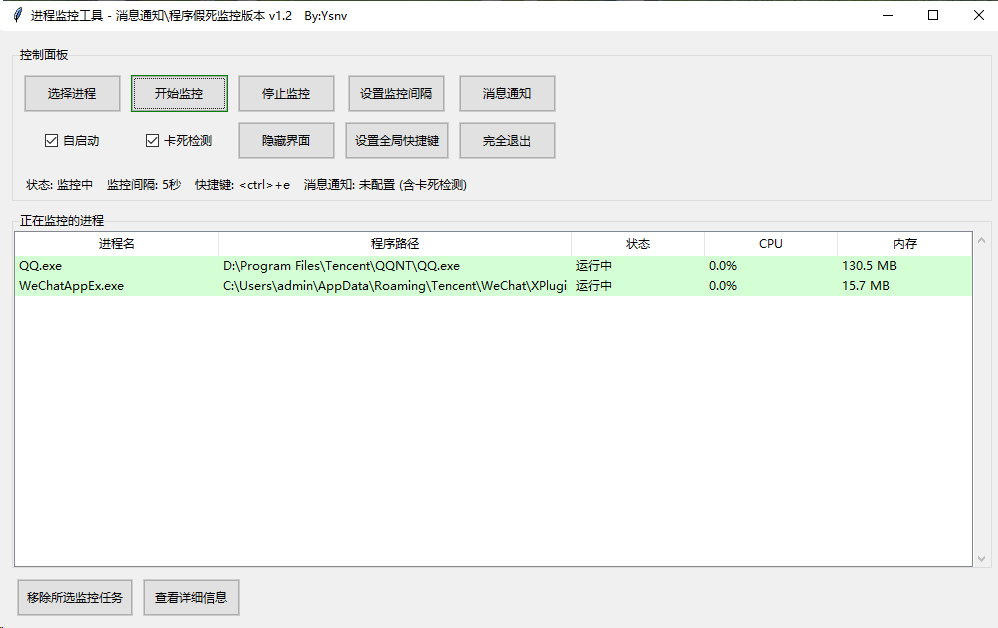
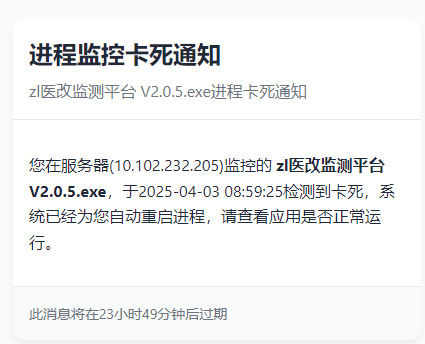
用 Python 写了个进程监控工具 V1.2,进程结束卡死自动重启并通知管理员!

  •  
  •   stayma · Apr 5, 2025 · 3439 views
    This topic created in 581 days ago, the information mentioned may be changed or developed.

    支持

    • Windows server 2008
    • Windows server 2012
    • Windows server 2012 R2
    • Windows server 2016
    • Windows server 2019
    • Windows 7
    • Windows 10
    • Windows 11 能平稳运行

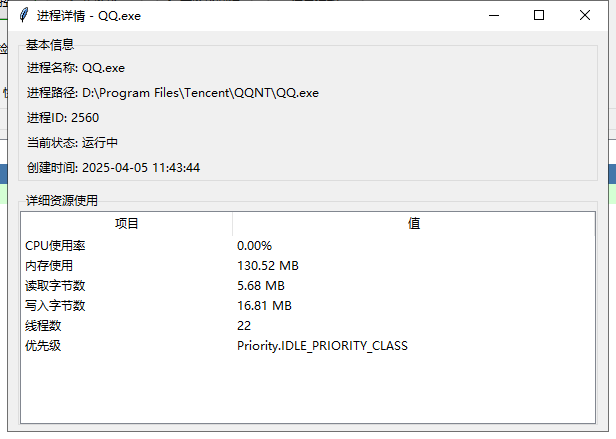
    截图

    image.png image.png image.png

    建议

    防卡死的逻辑是持续记录进程占用 CPU 的情况,如果一段时间 CPU 没变化就判定卡死,有一定的误判概率,请选择性开启。

    下载

    https://wwpg.lanzouq.com/ij1gU2slah1a

    8 replies  •  2025-04-06 11:53:47 +08:00
    dbit
    dbit
    Apr 5, 2025 via iPhone
    1
    Op 会开源吗 毕竟是服务器上运行的 exe
    stayma
    stayma
    OP
    Apr 5, 2025❤️1
    2
    可以开源,源码: https://wwpg.lanzouq.com/ib7co2scjufc
    这个版本不带假死监控
    w568w
    w568w
    Apr 5, 2025
    3
    建议:判断窗口是否挂起可以用 IsHungAppWindow ,https://learn.microsoft.com/zh-cn/windows/win32/api/winuser/nf-winuser-ishungappwindow

    或者用 SendMessageTimeout 发送随机信息(例如 WM_NULL ),看窗口是否在指定时间(例如 5 秒)内处理消息。
    keenkiller
    keenkiller
    Apr 6, 2025 via Android
    4
    纯 gui 程序比较有用,建议发到 github
    ostrichb
    ostrichb
    Apr 6, 2025
    5
    那工具本身卡死了怎麼辦()
    stayma
    stayma
    OP
    Apr 6, 2025
    6
    @w568w 我研究研究呢,大老
    stayma
    stayma
    OP
    Apr 6, 2025
    7
    @ostrichb 那就再开一个!!!套娃!
    dbit
    dbit
    Apr 6, 2025 via iPhone
    8
    👍👍👏
    @stayma
    About   ·   Help   ·   Advertise   ·   Blog   ·   API   ·   FAQ   ·   Privacy   ·   Solana   ·   1731 Online   Highest 6679   ·     Select Language
    创意工作者们的社区
    World is powered by solitude
    VERSION: 3.9.8.5 · 33ms · UTC 14:39 · PVG 22:39 · LAX 06:39 · JFK 09:39
    ♥ Do have faith in what you're doing.